Overview
Just Getting Started?
You're in the right place, the Workbench API Classes are the best way to get started with Workbench!
Welcome to the Workbench API Classes
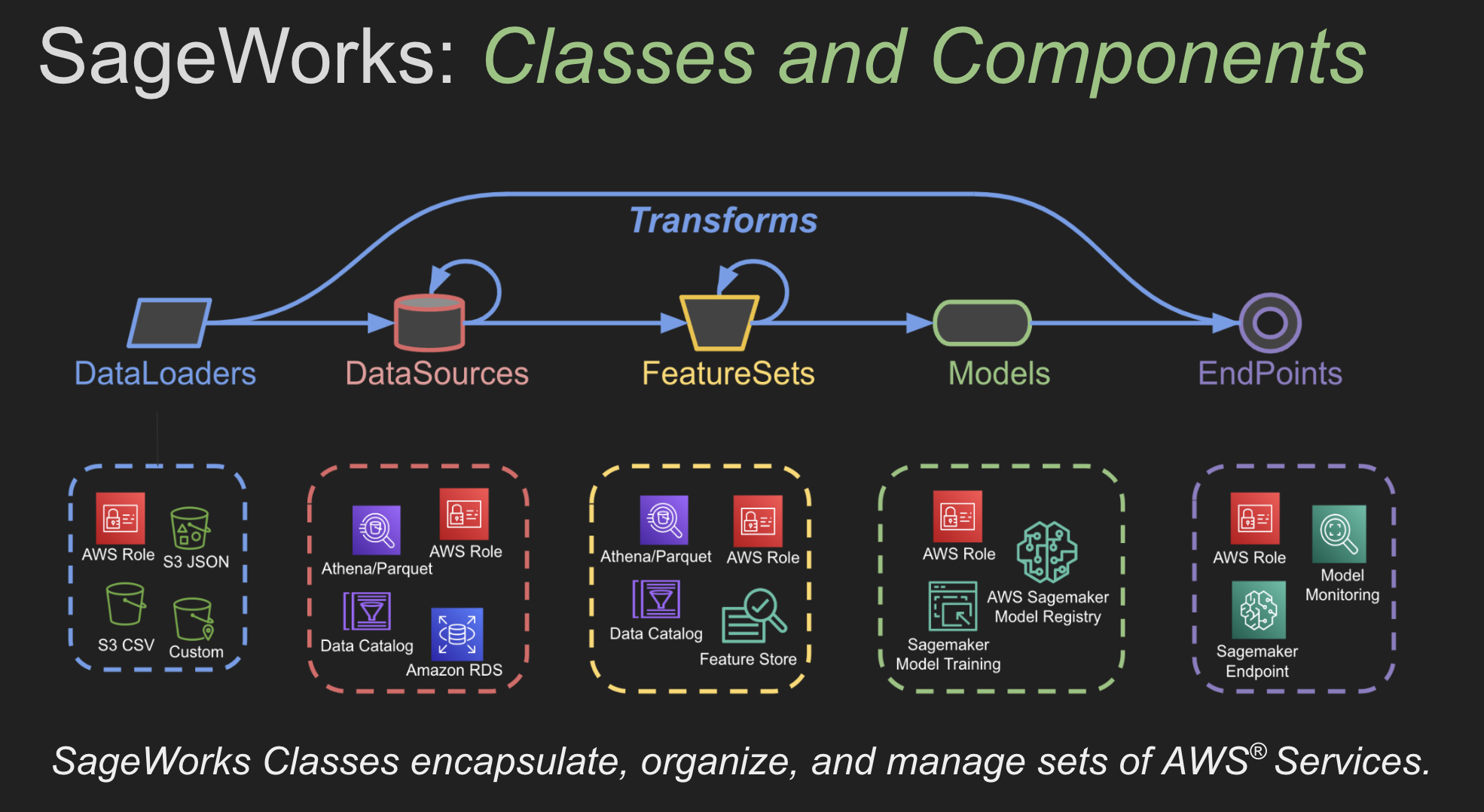
These classes provide high-level APIs for the Workbench package, they enable your team to build full AWS Machine Learning Pipelines. They handle all the details around updating and managing a complex set of AWS Services. Each class provides an essential component of the overall ML Pipline. Simply combine the classes to build production ready, AWS powered, machine learning pipelines.
- DataSource: Manages AWS Data Catalog and Athena
- FeatureSet: Manages AWS Feature Store and Feature Groups
- Model: Manages the training and deployment of AWS Model Groups and Packages
- Endpoint: Manages the deployment and invocations/inference on AWS Endpoints (auto-routes to the async transport when deployed with
async_endpoint=True) - MetaEndpoint: Endpoint backed by a DAG of child endpoints + aggregation nodes — feature pipelines and ensembles
- Monitor: Manages the setup and deployment of AWS Endpoint Monitors
- CachedMeta: API to retrieve AWS metadata for the above artifacts (recommended)
- Meta: Direct, uncached metadata API — use when you need to bypass the cache
- InferenceCache: Client-side S3 caching wrapper around an Endpoint's
inference() - ParameterStore: Manages AWS Parameter Store (workbench-bucket config, model metadata, feature lists)
- DFStore: Manages DataFrames in AWS S3 (Parquet/Snappy)
- InferenceStore: Manages inference results in Athena-queryable Parquet on S3
- PublicData: Read-only access to public S3 datasets (
comp_chem/*)
Example ML Pipline
from workbench.api import DataSource, FeatureSet, Model, ModelType, Endpoint

# Create the abalone_data DataSource
ds = DataSource("s3://workbench-public-data/common/abalone.csv")

# Now create a FeatureSet
ds.to_features("abalone_features", id_column="auto")

# Create the abalone_regression Model
fs = FeatureSet("abalone_features")
fs.to_model(
    name="abalone-regression",
    model_type=ModelType.REGRESSOR,
    target_column="class_number_of_rings",
    tags=["abalone", "regression"],
    description="Abalone Regression Model",
)

# Create the abalone_regression Endpoint
model = Model("abalone-regression")
model.to_endpoint(name="abalone-regression-end", tags=["abalone", "regression"])

# Now we'll run inference on the endpoint
endpoint = Endpoint("abalone-regression-end")

# Run inference on the Endpoint
results = endpoint.test_inference()
print(results[["class_number_of_rings", "prediction"]])
Output
Processing...
     class_number_of_rings  prediction
0                       12   10.477794
1                       11    11.11835
2                       14   13.605763
3                       12   11.744759
4                       17    15.55189
..                     ...         ...
826                      7    7.981503
827                     11   11.246113
828                      9    9.592911
829                      6    6.129388
830                      8    7.628252
Full AWS ML Pipeline Achievement Unlocked!
Bing! You just built and deployed a full AWS Machine Learning Pipeline. You can now use the Workbench Dashboard web interface to inspect your AWS artifacts. A comprehensive set of Exploratory Data Analysis techniques and Model Performance Metrics are available for your entire team to review, inspect and interact with.
Examples
All of the Workbench Examples are in the Workbench Repository under the examples/ directory. For a full code listing of any example please visit our Workbench Examples