Endpoint
Endpoint Examples
Examples of using the Endpoint class are listed at the bottom of this page Examples.
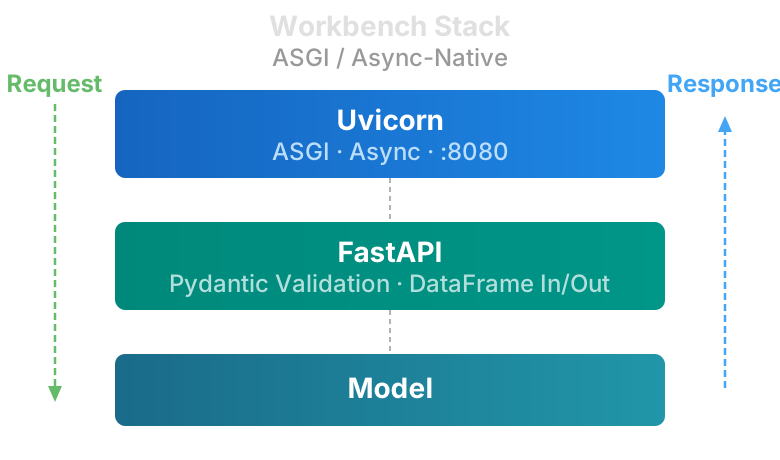
Endpoints manage AWS SageMaker endpoint creation, deployment, and inference. They handle model hosting, auto-scaling, data capture, and performance monitoring. The API is simple: send a DataFrame, get a DataFrame back. Workbench endpoints run on a modern ASGI stack (Uvicorn + FastAPI) and every endpoint follows this same DataFrame-in, DataFrame-out contract.
For long-running inference workloads (>60s per invocation), see AsyncEndpoint.
Endpoint: Manages AWS Endpoint creation and deployment. Endpoints are automatically set up and provisioned for deployment into AWS. Endpoints can be viewed in the AWS Sagemaker interfaces or in the Workbench Dashboard UI, which provides additional model details and performance metrics
Endpoint
Bases: EndpointCore
Endpoint: Workbench Endpoint API Class
If the underlying endpoint was deployed as async (workbench_meta["async_endpoint"]),
inference() / fast_inference() transparently route through an internal
async core so callers get correct behavior from a single object.
For feature endpoints (those that emit registered feature columns), use
:meth:output_columns to retrieve the column list.
Source code in src/workbench/api/endpoint.py
14 15 16 17 18 19 20 21 22 23 24 25 26 27 28 29 30 31 32 33 34 35 36 37 38 39 40 41 42 43 44 45 46 47 48 49 50 51 52 53 54 55 56 57 58 59 60 61 62 63 64 65 66 67 68 69 70 71 72 73 74 75 76 77 78 79 80 81 82 83 84 85 86 87 88 89 90 91 92 93 94 95 96 97 98 99 100 101 102 103 104 105 106 107 108 109 110 111 112 113 114 115 116 117 118 119 120 121 122 123 124 125 126 127 128 129 130 131 132 133 134 135 136 137 138 139 140 141 142 143 144 145 146 147 148 149 150 151 152 153 154 155 156 157 158 159 160 161 162 163 164 165 166 167 168 169 170 171 172 173 174 175 176 177 178 179 180 181 182 183 184 185 186 187 188 189 190 191 192 193 194 195 196 197 198 199 200 201 202 203 204 205 206 207 208 209 210 211 212 213 214 215 216 217 218 219 220 221 222 223 224 225 226 227 228 229 230 231 232 233 234 235 236 | |
cross_fold_inference(include_quantiles=False)
Pull cross-fold inference from model associated with this Endpoint
Parameters:
| Name | Type | Description | Default |
|---|---|---|---|
include_quantiles
|
bool
|
Include q_* quantile columns in saved output (default: False) |
False
|
Returns:
| Type | Description |
|---|---|
DataFrame
|
pd.DataFrame: A DataFrame with cross fold predictions |
Source code in src/workbench/api/endpoint.py
details(**kwargs)
Endpoint Details
Returns:
| Name | Type | Description |
|---|---|---|
dict |
dict
|
A dictionary of details about the Endpoint |
fast_inference(eval_df, threads=4)
Run inference on the Endpoint using the provided DataFrame
Parameters:
| Name | Type | Description | Default |
|---|---|---|---|
eval_df
|
DataFrame
|
The DataFrame to run predictions on |
required |
threads
|
int
|
The number of threads to use (default: 4) |
4
|
Returns:
| Type | Description |
|---|---|
DataFrame
|
pd.DataFrame: The DataFrame with predictions |
Note
There's no sanity checks or error handling... just FAST Inference!
Source code in src/workbench/api/endpoint.py
full_inference()
Run inference on the Endpoint using the full data from the model training view
Returns:
| Type | Description |
|---|---|
DataFrame
|
pd.DataFrame: The DataFrame with predictions |
inference(eval_df, capture_name=None, id_column=None, drop_error_rows=False, include_quantiles=False)
Run inference on the Endpoint using the provided DataFrame
Parameters:
| Name | Type | Description | Default |
|---|---|---|---|
eval_df
|
DataFrame
|
The DataFrame to run predictions on |
required |
capture_name
|
str
|
The Name of the capture to use (default: None) |
None
|
id_column
|
str
|
The name of the column to use as the ID (default: None) |
None
|
drop_error_rows
|
bool
|
Whether to drop rows with errors (default: False) |
False
|
include_quantiles
|
bool
|
Include q_* quantile columns in saved output (default: False) |
False
|
Returns:
| Type | Description |
|---|---|
DataFrame
|
pd.DataFrame: The DataFrame with predictions |
Source code in src/workbench/api/endpoint.py
inference_batch_size()
Return the per-invocation batch size declared for this endpoint.
Reads workbench_meta["inference_batch_size"] if set; otherwise
returns the framework default — 10 for async endpoints, 100 for sync.
Source code in src/workbench/api/endpoint.py
input_columns()
Return this endpoint's declared input columns.
The columns the endpoint consumes during inference (e.g. ["smiles"]
for a feature endpoint, or the model's training features for a
predictor endpoint).
Cached at /workbench/endpoints/<name>/input_columns; lazily
populated by :func:workbench.utils.endpoint_utils.register_input_columns
on first call (reads model.features()) and refreshed when the
backing model changes.
Source code in src/workbench/api/endpoint.py
instance_counts()
Return this endpoint's current and desired instance counts.
Refreshes endpoint metadata from AWS first so the result reflects live autoscaling state, not the snapshot from construction time.
Shape depends on the endpoint:
- Regular endpoint:
{"current": N, "desired": M}. - MetaEndpoint: a flat dict keyed by endpoint name listing the
meta itself plus each async child, e.g.
{"meta-name":  {"current": 1, "desired": 1},
      "child-a":   {"current": 8, "desired": 8}}
.
Returns {} for serverless endpoints (no meaningful instance
count) or if the AWS describe-endpoint metadata is unavailable.
Source code in src/workbench/api/endpoint.py
output_columns()
Return this endpoint's registered output columns.
Works for any endpoint that emits new columns during inference: feature endpoints emit computed feature columns; predictor endpoints emit prediction / confidence / quantile columns.
Cached at /workbench/endpoints/<name>/output_columns; lazily
populated by :func:workbench.utils.endpoint_utils.register_output_columns
on first call (smoke inference) and refreshed when the backing model
changes.
Source code in src/workbench/api/endpoint.py
purge_async_queue()
Cancel queued async invocations by deleting their staged S3 inputs.
Useful when a long-running client was killed and you want to abandon the orphaned backlog instead of waiting for the fleet to drain it. Only valid on async endpoints — raises on sync endpoints.
Returns:
| Name | Type | Description |
|---|---|---|
int |
int
|
Number of staged input objects deleted. |
Source code in src/workbench/api/endpoint.py
test_inference(*args, **kwargs)
Smoke-test the Endpoint by running inference on a sample of rows.
Async endpoints default to a smaller sample (per-row cost is high).
Returns:
| Type | Description |
|---|---|
DataFrame
|
pd.DataFrame: The DataFrame with predictions |
Source code in src/workbench/api/endpoint.py
ts_inference(date_column, after_date, exclude_ids=None)
Run temporal hold-out inference on this Endpoint.
Re-runs the temporal split on the FeatureSet data to identify holdout rows (those with date > after_date), then runs inference on that holdout set.
Parameters:
| Name | Type | Description | Default |
|---|---|---|---|
date_column
|
str
|
Name of the date column. |
required |
after_date
|
str
|
Run inference on rows strictly after this date. |
required |
exclude_ids
|
list
|
IDs to exclude from the holdout set (e.g., anomalous compounds). |
None
|
Returns:
| Type | Description |
|---|---|
DataFrame
|
pd.DataFrame: DataFrame with the inference results (empty if no hold-out rows) |
Source code in src/workbench/api/endpoint.py
Examples
Run Inference on an Endpoint
from workbench.api import Endpoint
from workbench.utils.endpoint_utils import get_evaluation_data

# Grab an existing Endpoint
endpoint = Endpoint("abalone-regression-end")

# Workbench has full ML Pipeline provenance, so we can backtrack the inputs,
# get a DataFrame of data (not used for training) and run inference
df = get_evaluation_data(endpoint)

# Run inference/predictions on the Endpoint
results_df = endpoint.inference(df)

# Run inference/predictions and capture the results
results_df = endpoint.inference(df, capture=True)

# Run inference/predictions using the FeatureSet evaluation data
results_df = endpoint.test_inference()
Output
Processing...
     class_number_of_rings  prediction
0                       13   11.477922
1                       12   12.316887
2                        8    7.612847
3                        8    9.663341
4                        9    9.075263
..                     ...         ...
839                      8    8.069856
840                     15   14.915502
841                     11   10.977605
842                     10   10.173433
843                      7    7.297976
The details() method
The detail() method on the Endpoint class provides a lot of useful information. All of the Workbench classes have a details() method try it out!
from workbench.api.endpoint import Endpoint
from pprint import pprint

# Get Endpoint and print out it's details
endpoint = Endpoint("abalone-regression-end")
pprint(endpoint.details())
Output
{
 'input': 'abalone-regression',
 'instance': 'Serverless (2GB/5)',
 'model_metrics':   metric_name  value
            0        RMSE  2.190
            1         MAE  1.544
            2          R2  0.504,
 'model_name': 'abalone-regression',
 'model_type': 'regressor',
 'modified': datetime.datetime(2023, 12, 29, 17, 48, 35, 115000, tzinfo=datetime.timezone.utc),
     class_number_of_rings  prediction
0                        9    8.648378
1                       11    9.717787
2                       11   10.933070
3                       10    9.899738
4                        9   10.014504
..                     ...         ...
495                     10   10.261657
496                      9   10.788254
497                     13    7.779886
498                     12   14.718514
499                     13   10.637320
 'workbench_tags': ['abalone', 'regression'],
 'status': 'InService',
 'name': 'abalone-regression-end',
 'variant': 'AllTraffic'}
Endpoint Metrics
from workbench.api.endpoint import Endpoint

# Grab an existing Endpoint
endpoint = Endpoint("abalone-regression-end")

# Workbench tracks both Model performance and Endpoint Metrics
model_metrics = endpoint.details()["model_metrics"]
endpoint_metrics = endpoint.endpoint_metrics()
print(model_metrics)
print(endpoint_metrics)
Output
  metric_name  value
0        RMSE  2.190
1         MAE  1.544
2          R2  0.504

    Invocations  ModelLatency  OverheadLatency  ModelSetupTime  Invocation5XXErrors
29          0.0          0.00             0.00            0.00                  0.0
30          1.0          1.11            23.73           23.34                  0.0
31          0.0          0.00             0.00            0.00                  0.0
48          0.0          0.00             0.00            0.00                  0.0
49          5.0          0.45             9.64           23.57                  0.0
50          2.0          0.57             0.08            0.00                  0.0
51          0.0          0.00             0.00            0.00                  0.0
60          4.0          0.33             5.80           22.65                  0.0
61          1.0          1.11            23.35           23.10                  0.0
62          0.0          0.00             0.00            0.00                  0.0
...
Workbench UI
Running these few lines of code creates and deploys an AWS Endpoint. The Endpoint artifacts can be viewed in the Sagemaker Console/Notebook interfaces or in the Workbench Dashboard UI. Workbench will monitor the endpoint, plot invocations, latencies, and tracks error metrics.
Not Finding a particular method?
The Workbench API Classes use the 'Core' Classes Internally, so for an extensive listing of all the methods available please take a deep dive into: Workbench Core Classes