Deploying S3 Plugins with the Dashboard
Need Help?
The SuperCowPowers team is happy to give any assistance needed when setting up AWS and Workbench. So please contact us at workbench@supercowpowers.com or on chat us up on Discord
Notes and information on how to include S3 based plugins with your Workbench Dashboard.
Deploying your Dashboard plugins via an S3 bucket allows plugin developers to modify and improve plugins without a bunch of Docker builds, ECR, and CDK Deploy.
Check your Dashboard
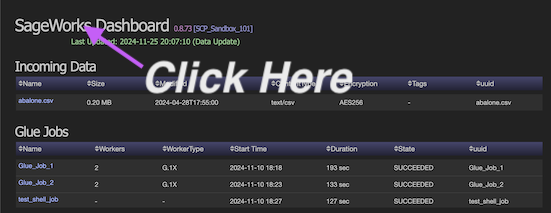
Make sure your Dashboard is configured to pull plugin pages, views, and components from an S3 bucket. Go to your main dashboard page and there's a 'secret link' when you click on the main title that brings up the Dashboard Status Page.
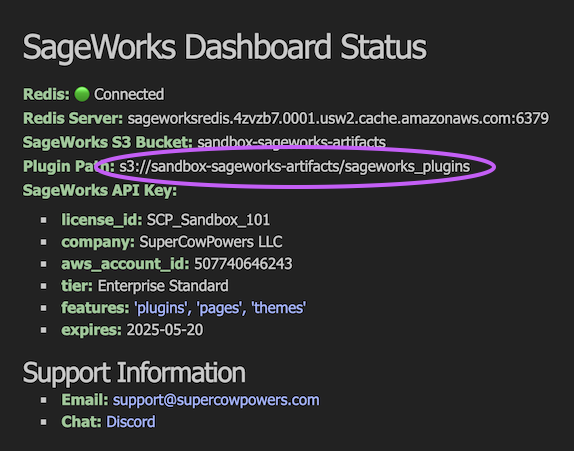
Dashboard Status Page Okay now check your Plugin Path: config and make sure it points to the S3 bucket you're expecting.
Develop your Plugins
During development it's good to both unit testing and local dashboard testing. Please see our main plugin docs for how to do local testing Plugins General.
When you're ready to 'deploy' the plugins you can copy them up to the S3 bucket/prefix. Copy recursively so the dashboard picks up everything — including any clientside assets/ (JS/CSS):
- my_plugins
   - pages
      - page_1.py
   - views
      - view_1.py
   - components
      - component_1.py
      - component_2.py
   - assets
      - my_page
         - render.js
         - styles.css
Copy assets, skip the junk
An --include "*.py"-only copy silently drops your assets/ JS/CSS. Exclude the compiled/hidden files instead, so everything else (Python and assets) comes along.
cd my_plugins
aws s3 cp . s3://my_bucket/prefix --recursive \
  --exclude "*.pyc" --exclude "__pycache__/*" --exclude ".*"
Restart the ECS Service
Okay, so this is a bit heavy handed, but automatically removing/adding/modifying the plugin pages, views, and components was 'amazingly complicated' and will be a feature request for a later date. :)
Getting Cluster and Service Names
You can go to the AWS Console, Elastic Container Service, find the cluster, click on that and find the service.
The cluster will be something like:
and the service will be something like:
Anyway, find those two things and run this command below (Note: You probably need admin permisions)
aws ecs update-service --cluster your-cluster-name \
--service your-service-name --force-new-deployment
Important: Even though this command will finish immediately, the ECS service will slowly flip over to the new instance (like 5-10 minutes), so wait a bit before testing the changes.
Verify new Plugin changes
Okay now that the ECS service has restarted (which can take a bit) you can now go to the Dashboard and test/verify that the changes you made now show up on the Dashboard.
Questions?

The SuperCowPowers team is happy to answer any questions you may have about AWS and Workbench. Please contact us at workbench@supercowpowers.com or on chat us up on Discord